
Submitting a Scoring Inquiry
Question a score or report a potential scoring error for your boat
If you believe your boat's score is incorrect or have a question about how you were scored, you can submit a scoring inquiry. This guide explains how to file an inquiry and what to expect during the review process.
Accessing the Scoring Inquiry Form
Go to the Results Page
- Navigate to the regatta's public page
- Click on the "Results" tab
- Ensure you are logged into your RegattaHub account (required)
Locate the Scoring Inquiry Button
Once on the Results page, look for the "Scoring Inquiry" button. It:
- Appears in the upper-right area of the Results page
- Is located near the "Series Results" heading
- Has a question mark icon
- Only displays when you are logged in

You must be logged in with a competitor account to see and use the Scoring Inquiry button.
Completing the Inquiry Form
Open the Form
Click "Scoring Inquiry" to open a modal form that overlays the page with the following fields to fill out.
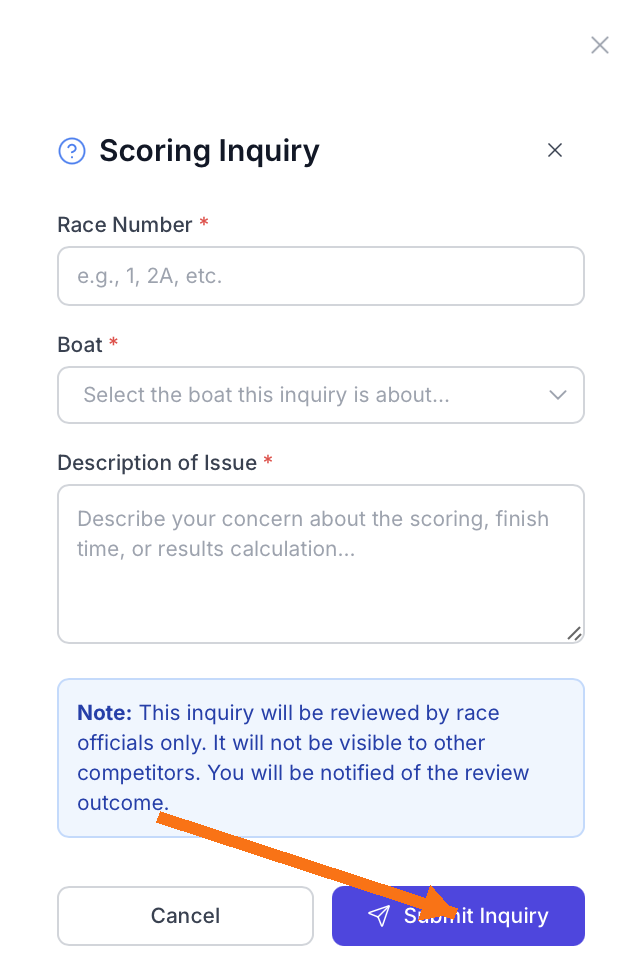
Form Fields
Race Number
Select the race number that contains the score you are questioning. Choose from the dropdown list of completed races.
Your Boat Selection
Select your boat from the dropdown menu. The form shows all your registered boats for this regatta with their sail numbers and boat names.
Describe the Issue
Provide a detailed description of your concern. Be as specific as possible:
- What score you received (points, place, or corrected time)
- What score you believe is correct
- Why you think there is an error
- Any relevant details (GPS data, finish line witnesses, corrected time calculations)
- Any other context that might help the race committee understand
Privacy Notice
Before submitting, you will see this notice:
This inquiry will be reviewed by race officials only. It will not be visible to other competitors. You will be notified of the review outcome.
Submit the Inquiry
- Review all information for accuracy
- Click "Submit Inquiry" to send
- The system validates all required fields
- Your inquiry is saved and timestamped
- Race officials receive a notification
Submit inquiries promptly after reviewing results. Don't wait until the final day of the regatta to file.
After Submitting Your Inquiry
Immediate Confirmation
Upon successful submission, you will see:
- A green success notification message
- Text confirming: "Scoring inquiry submitted successfully! It will be reviewed by race officials."
- The form closes automatically
- You return to the Results page
Tracking Your Inquiry
RegattaHub currently does not provide:
- A dedicated inquiry status page for competitors
- A submission history view in your account
- Direct status updates within the app
- The ability to edit inquiries after submission
To track your inquiry, you must:
- Watch for email notifications from the race committee
- Check the results page regularly for corrected scores
- Monitor in-app notifications
- Contact the race committee directly if urgent
Best Practices for Scoring Inquiries
- Double-check your math: Verify your own calculations before submitting. Review your elapsed time vs. corrected time.
- Reference the rules: If applicable, cite relevant racing rules or scoring system rules (ORC, PHRF, etc.).
- Submit early: Don't wait until the last moment. Give race officials time to investigate.
- Be respectful: Assume the race committee made an honest mistake. Professional tone increases likelihood of favorable review.
- Gather evidence: Have timestamps, witness information, or documentation ready if needed.
- Check Notice Board: Look for any announcements about scoring corrections or clarifications.
Frequently Asked Questions
What counts as a scoring error?
Examples include: wrong finish time recorded, incorrect rating applied, missing data entry, calculation error in corrected time, or wrong division/fleet assignment.
Is there a time limit to file an inquiry?
Check the race committee's Notice of Race or Sailing Instructions for specific deadlines. Generally, it's best to submit within 24 hours of results being posted.
What's the difference between a protest and a scoring inquiry?
A protest contests another boat's conduct or a rule violation. A scoring inquiry questions whether your score was calculated correctly. They are separate processes with different committees reviewing them.