
Understanding Results Interface
Navigate race results, series standings, and detailed scoring information
The Results tab on the regatta public page shows all racing activity and scoring. This guide explains how to read the results, understand the standings, and access detailed race information.
Accessing Results
Navigate to the Results Tab
- Go to the regatta's public page on RegattaHub
- Click the "Results" tab at the top of the page
- You'll arrive at the Series Results view
Key Interface Elements
Fleet Navigation Buttons
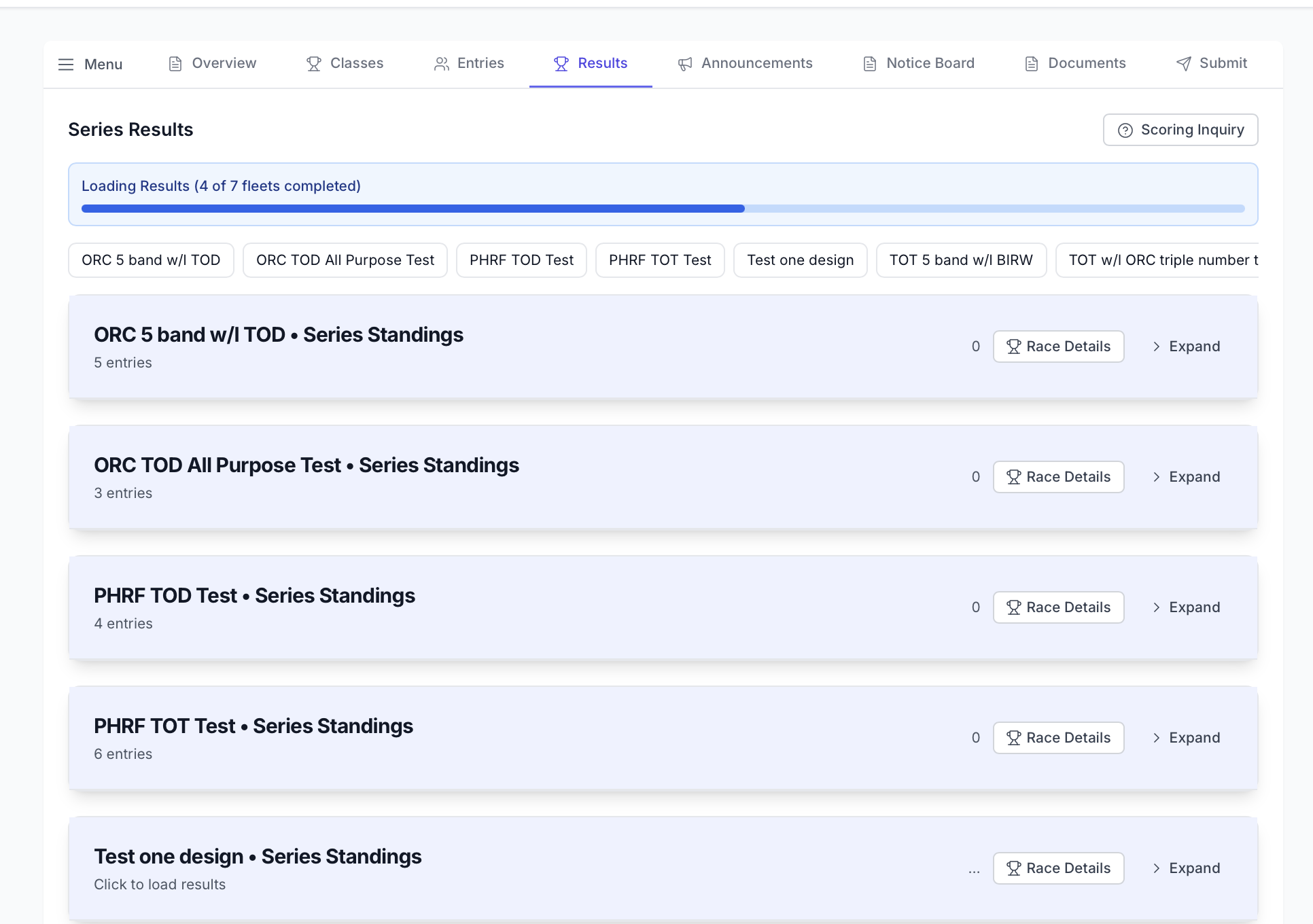
If the regatta has multiple fleets or divisions, you'll see a horizontal row of fleet buttons at the top:
- Each button represents a different fleet or racing class
- Click any button to jump directly to that fleet's standings
- The currently active fleet button is highlighted
- This makes it easy to switch between fleets without scrolling
Fleet Standings Sections
Each fleet has its own collapsible section that displays:
- Fleet Name: The class or fleet name (e.g., "PHRF Total Hours")
- Entry Count: Number of boats entered in this fleet
- Race Progress: Number of completed races (e.g., "3 of 5 races")
- Race Details Button: Opens detailed race-by-race results
- Expand/Collapse Button: Shows or hides the standings table
Standings Table (Expanded View)
When you expand a fleet section, you see a table with the following columns:
- Pos (Position): Your place in the series standings (1st, 2nd, 3rd, etc.)
- Sail #: Your boat's sail number
- Skipper: Name of the boat's skipper
- Boat Name: The name of your boat
- Boat Type: Class or type of boat (e.g., "J/24", "Viper 640")
- Race Scores: Individual race results in numbered columns (Race 1, Race 2, etc.)
- Total: Total points accumulated (including throwouts)
- Net: Net points after throwouts are applied
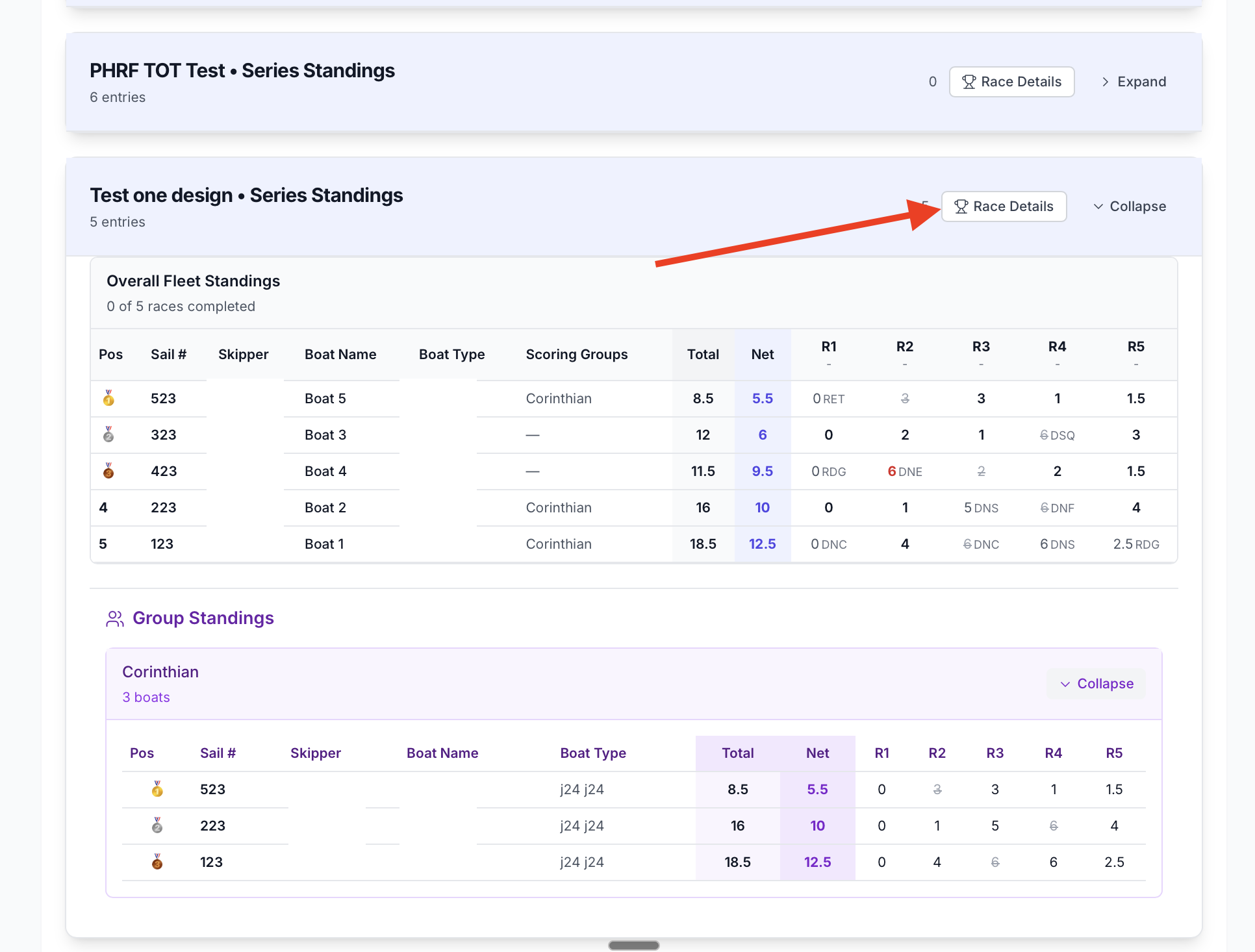
Hover over a race number column header to see that race's date and time. Hover over an individual race score to see the elapsed and corrected times.
Understanding Your Scores
Score columns in the table show your finish position or points for each race:
- Low numbers are better: 1st place = 1 point, 2nd place = 2 points, etc.
- Throwouts: If a race is marked with a line through it, it's being discarded as a throwout
- Scoring systems vary: Some fleets use place scoring, others use time-on-distance
- Check the Sailing Instructions for how your specific fleet is scored
Scoring Groups
Some regattas use scoring groups to show subgroups within a fleet. For example:
- A PHRF fleet might have scoring groups for boats with different rating ranges
- Scoring groups use the same points as the overall fleet
- They show separate series standings within the larger fleet
- Groups appear both in the overall series standings and as separate sections
Accessing Race Details
View Detailed Race Information
To see detailed, race-by-race information:
- Locate the fleet's standings section
- Click the "Race Details" button at the top of the section
- This opens a detailed view showing race-by-race data
Information in Race Details View
The race details view includes:
- Finish Times: Actual crossing time at the finish line
- Elapsed Times: Time from start to finish
- Corrected Times: Adjusted time based on handicap rating (for handicap races)
- Ratings Used: The boat's handicap rating applied to that race
- Penalties: Any scoring penalties or adjustments applied
- Discard Status: Whether the race is being used or discarded in the series
If you don't see corrected times, your fleet is likely using place scoring or one design racing where time correction isn't used.
Interpreting Your Results
Common Symbols and Abbreviations
- DNS: Did Not Start
- DNF: Did Not Finish
- DNC: Did Not Come (Did Not Participate)
- DSQ: Disqualified
- OCS: On Course Side (started prematurely)
- RET: Retired from race
- BFD: Bad Finish Downwind
If you see one of these markings and don't understand why, file a scoring inquiry through the Submit tab.
Questions About Your Results?
If you believe there's an error in your results or have questions about your score:
- Submit a scoring inquiry through the "Submit" tab
- Review the Sailing Instructions for scoring rules
- Check the Notice Board for official announcements
- Contact the race committee directly with questions