
Creating a Regatta: Fleets/Classes
In this section, you will configure the fleets that boats can register for in your regatta. At least one class is required before you can create your
Not ready for a real event?
Test all RegattaHub features with mock data — no payment setup required.
Learn how to create a mock regattaIn this section, you will configure the fleets that boats can register for in your regatta. At least one class is required before you can create your regatta. Each class defines the boat types, scoring method, & entry fees for a group of competitors.
Important: You must add at least one sailing class before the “Create Regatta” button becomes available.
Prerequisites
Before configuring classes, you should have:
- Completed the Basic Information section (
- Decided which boat classes will compete in your regatta
- Determined the appropriate scoring method for each class
- Set entry fee amounts for each class
Understanding Sailing Fleet
A sailing class is a category of boats that will be scored together. Classes can be:
- One-design fleets (identical boats, like Viper 640, J/70, etc.)
- phrf/orc fleets (different boats scored with a rating system like PHRF or ORC)
Adding Your First Fleet
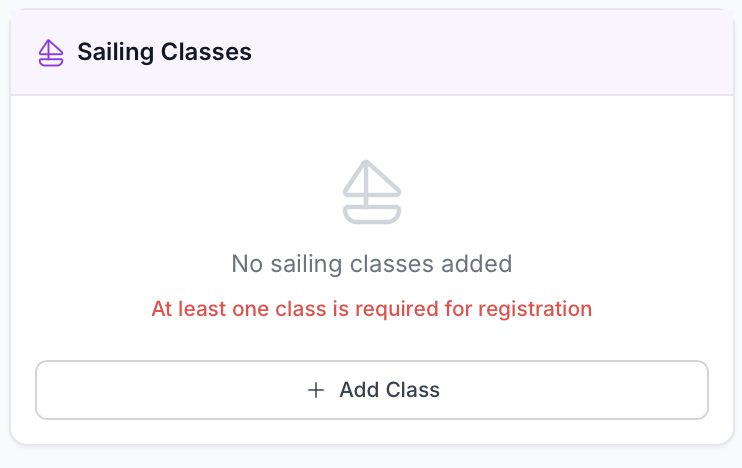
- Locate the Sailing Classes Section
- This appears in the right column of the regatta creation form
- You’ll see a message: “No sailing classes added” with a reminder that at least one is required
- Click the “Add Class” Button
- The button displays a plus icon and says “Add Class”
- A form will appear with fields for class configuration
Configuring Class Fields
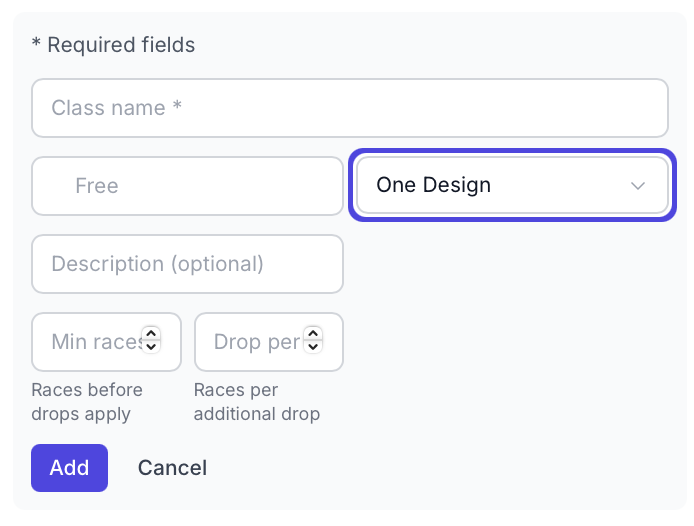
Required Fields
Class Name
What it is: The display name for this class that competitors will see.
Entry Fee
What it is: The base entry fee in dollars for this class. Enter amount in dollars, leave blank or enter 0 for free entries
Important Notes:
- This is the BASE fee before any late registration fees
- Late registration fees (configured in Section 2) are added on top of this amount
- Fees are shown but not charged if you have not setup a Stripe account to collect fees
Scoring Type
What it is: The method used to calculate corrected times and determine finishing positions.
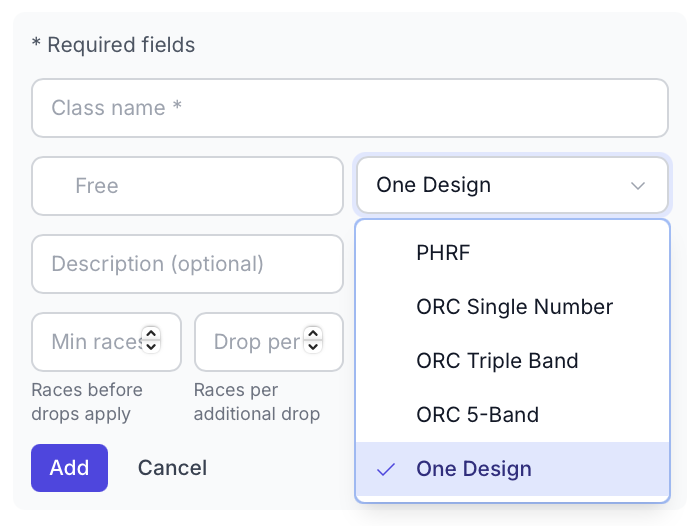
Click the dropdown to see all available scoring types:
Optional Fields
Description
What it is: Additional information about this class displayed to competitors.
Drop Races (Throw-outs)
RegattaHub uses a flexible drop system that automatically calculates throw-outs based on the number of races sailed.
Min Races Before Drops Apply
What it is: The minimum number of races that must be completed before any scores can be dropped.
Races Per Additional Drop
What it is: After the minimum races, how many additional races earn another drop.
Leave blank if: You want the default behavior (no drops)
Managing Multiple Classes
Adding Additional Classes
After adding your first class, the class will appear in the list above the form. To add another class:
- The “Add Class” button will reappear
- Click it to add another class
- Configure the new class with different settings
- Repeat for each class in your regatta
Editing Classes
During regatta creation: You can edit or delete classes freely.
After regatta is created:
- Class name and description can be changed
- Entry fees can be modified
- Scoring type CANNOT be changed after races are created
Deleting Classes
During creation: Click the delete/trash icon next to the class name.
Important: You cannot delete the last class - at least one class is always required.
Enabling Regatta Creation
Once you’ve added at least one sailing class, the “Create Regatta” button at the top of the form becomes enabled.
Before adding a class:
- Button is grayed out and disabled
- Message displays: “Please add at least one sailing class before creating the regatta”
After adding a class:
- Button becomes active and clickable
- You can now create your regatta
- All other required fields (Basic Information) must also be completed