Admin Page Overview
Your comprehensive guide to navigating the admin dashboard
Not ready for a real event?
Test all RegattaHub features with mock data — no payment setup required.
Learn how to create a mock regattaThe admin dashboard is your mission control for managing every aspect of your regatta. Understanding its structure and navigation is key to effective regatta management.
Dashboard Layout
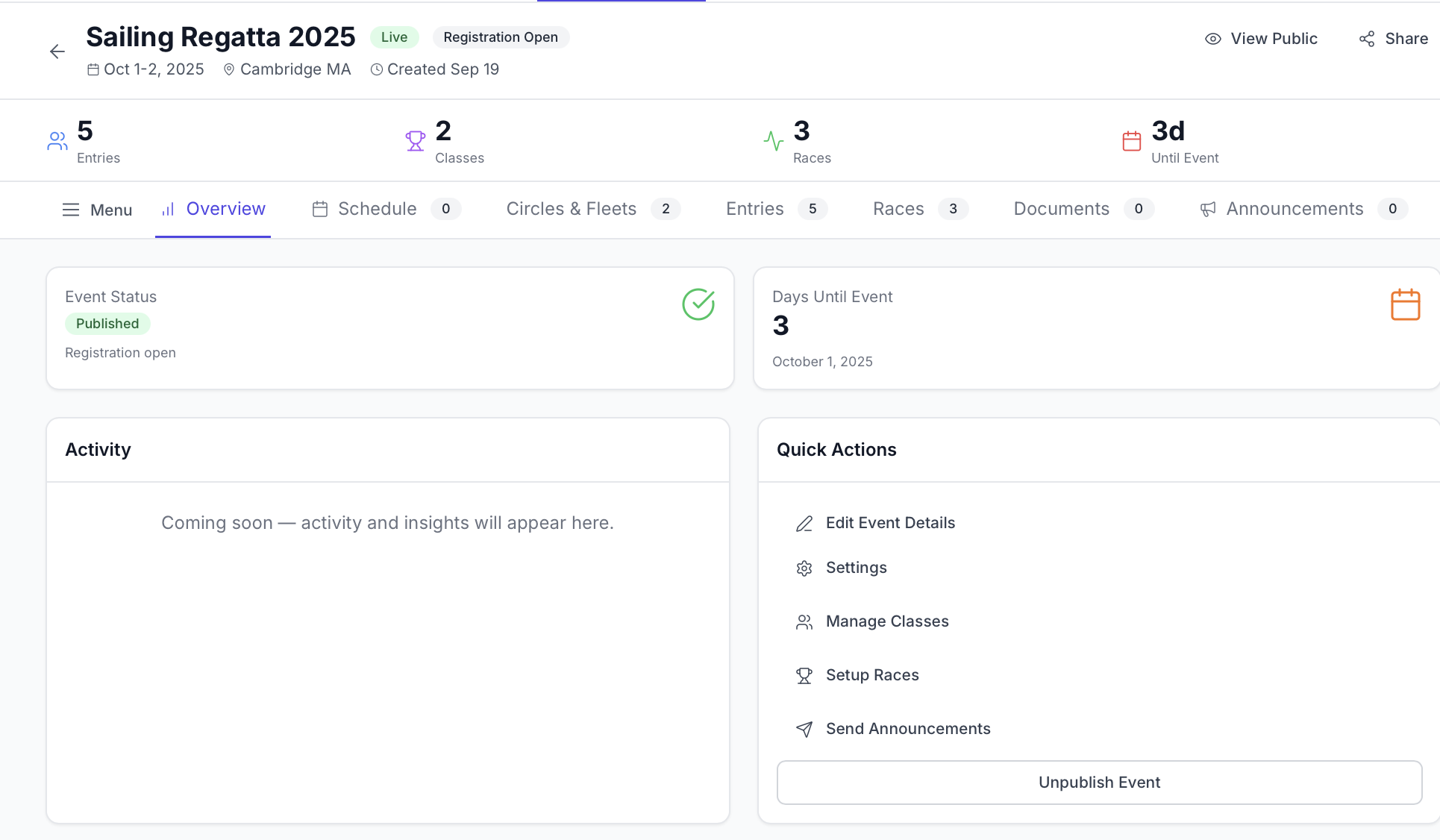
The admin dashboard consists of three main areas:
-
Header Section (always visible)
- Regatta name and logo
- Status badges
- Key regatta information (dates, location)
- Quick action buttons
-
Tab Navigation (horizontal tabs below header)
- Overview, Schedule, Circles & Fleets, Entries, Races, Documents, Announcements, Notice Board, Billing, Payments, Products
- Each tab shows a count badge when applicable
- Active tab is highlighted
-
Content Area (main workspace)
- Changes based on selected tab
- Contains tab-specific tools, tables, and actions
- Responsive layout adapts to screen size
Tab Navigation Overview
RegattaHub organizes admin functions into dedicated tabs. Here's what each tab is for:
Overview Tab
- Purpose: High-level regatta statistics and quick actions
Schedule Tab
- Purpose: Manage your regatta schedule and daily itinerary
- What you'll find: Add/edit scheduled items, set times and locations, publish schedule to participants
Circles & Fleets Tab
- Purpose: Manage racing circles, and fleets
- What you'll find: Create and edit fleets, set scoring systems, set entry fees, configure handicap systems
Entries Tab
- Purpose: View and manage all boat entries and crew information
- What you'll find: Complete entry list, boat details, crew rosters, payment status, waiver compliance, check-in tool
Entries are covered in depth in the Managing Entries article.
Races Tab
- Purpose: Score races and manage race results
- What you'll find: Create races, enter finish orders, apply penalties, publish results, handle inquiries
Documents Tab
- Purpose: Manage regatta documents (NOR, SI, amendments)
- What you'll find: Upload and link to Notice of Race, Sailing Instructions, and other documents
Announcements Tab
- Purpose: Send messages and updates to all participants
- What you'll find: Create announcements, send to all or specific groups, view announcement history
Notice Board Tab
- Purpose: Manage official race notices and protests
- What you'll find: Post race committee notices, view and process protests, publish official communications
Billing Tab
- Purpose: Monitor billing and invoices
- What you'll find: Entry-based billing history, weekly invoices, payment method management
Payments Tab
- Purpose: Track and manage entry fee payments (Direct Connect only)
- What you'll find: Payment history, transaction details, refund processing
Products Tab
- Purpose: Create and manage add-on products and merchandise (Direct Connect only)
- What you'll find: Create products, set pricing, manage inventory, track sales
Switching Between Tabs
To navigate between tabs:
- Click on any tab name in the navigation bar
- The selected tab highlights with a colored underline
- The content area updates to show tab-specific information
- The browser URL changes to reflect the active tab
You can bookmark specific tabs for quick access. Each tab has its own URL that you can save.